Creating an ESP32 based dice for chess

A LILYGO T-Display-S3 board running a CircuitPython program that randomly chooses and shows a chess piece.

My kid loves chess and lately he has been playing the dice chess variant with his friends. For those unfamiliar, it is when a die roll determines which piece type can be moved (e.g., 1=Pawn, 2=Rook, 3=Knight, etc.). However, this is inconvenient because players have to remember which chess piece corresponds to each number, and the mapping has to be explained to every new player.

I’ve had an idea on the back burner for some time to do an embedded project using CircuitPython and an ESP32 based board. Improving his dice chess setup sounded like a great excuse for this.

So I wrote esp32-dice-chess which is just a simple program to randomly choose a chess piece and shows its image on a screen. The code is meant to be used on a T-Display-S3 but it should be easy to port it to a different board.

The ability to use Python for microcontroller firmware development is very convenient, especially for rapid prototyping and ease of development. I totally recommend it to folks doing hardware tinkering.

Happy hacking!

Using an SPI SSD1306 OLED on Fedora with a Raspberry Pi

In a previous post I explained how to use a Solomon SSD1306 OLED display on Fedora with a Raspberry Pi, but that only covered displays that come with a I2C driving interface.

The SSD1306 display controller also supports a (both 3-wire and 4-wire) SPI interface, and the ssd130x DRM driver has support for it since Linux 5.19.

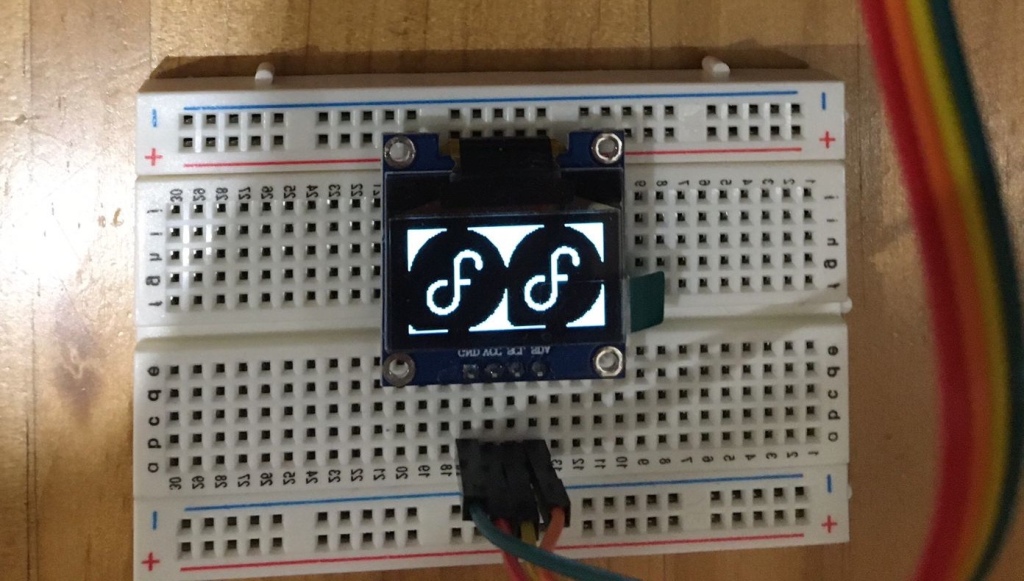
This blog post explains how to setup Fedora to use a SSD1306 OLED when connected through 4-wire SPI interface.

First you need connect the SSD1306 display to the RPi, there are different ways to do this since one can choose the GPIO to use for some the reset and data/command pins.

But to simplify the configuration, one could use the default GPIO pins that are defined in the ssd1306-spi.dtbo provided by the RPi firmware package.

To do this, connect the SSD1306 display to the RPi as follows:

Then you need to install Fedora, this can be done by downloading an aarch64 Fedora raw image (e.g: Workstation Edition) and executing the following command:

sudo arm-image-installer --image $image --target=rpi4 -- \\
media=$device --addconsole --addkey=id_rsa.pub \\
--norootpass --resizefs

where $device is the block device for your uSD (e.g: /dev/sda) and image is the file name (e.g: Fedora-Workstation-40-1.14.aarch64.raw.xz) of the downloaded image.

Finally you need to configure the RPi firmware to enable the SPI pins and load the ssd1306-spi Device Tree Blob Overlay (dtbo) to register a SSD1306 SPI device, e.g:

sudo cat << EOF >> /boot/efi/config.txt
dtparam=spi=on
dtoverlay=ssd1306-spi,inverted
EOF

The ssd1306-spi.dtbo supports many parameters in case your display doesn’t match the defaults. Take a look to the RPi overlays README for more details about all these parameters and their possible values.

The ssd130x DRM driver registers an emulated fbdev device that can be bound with fbcon and use the OLED display to have a framebuffer console. If you want to do that, it’s convenient to change the virtual terminal console font to a smaller one, e.g:

sudo sed -i 's/FONT=.*/FONT="drdos8x8"/' /etc/vconsole.conf
sudo dracut -f

And that’s it. Happy hacking!

Some useful Linux kernel cmdline debug parameters to troubleshoot driver issues

I have written before on how to troubleshoot drivers’ deferred probe issues in Linux. And while having a /sys/kernel/debug/devices_deferred debugfs entry is quite useful to know the list of devices whose drivers failed to probe due being deferred [0], there are also some debug command line parameters that could help with the troubleshooting.

But first, an explanation of what these parameters do:

Devices require different resources in order to be operative, for example a display controller could need a set of clocks, power domains and regulators to be enabled.

Ideally, if these are managed by Linux, these should be declared in the hardware description that is handled to the kernel (e.g: Device Tree Blobs) but sometimes this isn’t the case. And devices may be working just because the firmware that booted Linux left these required resources enabled.

But of course this has the disadvantage that Linux can’t manage those, and can’t for example disable a clock or power domain when is not used.

It is common though to add support for a platform incrementally and so it could be that at the beginning this relies on the setup made by the firmware (e.g: some required clocks left enabled and Linux not knowing about them). But later, support for these clocks could and the Common Clock Framework (CCF) will now be aware of them.

But it could be that the Device Tree was not updated to define the dependency between some device that requires these introduced clocks. If that is the case, the clocks may appear to be unused by the system and the CCF rightfully decide to disable them [1].

If that is the case, this message is printed in the kernel log buffer:

[    5.189930] clk: Disabling unused clocks

This will of course make the device to not work anymore because one of its required clock has been gated.

To prevent this, there is a debug clk_ignore_unused command line parameter that can be used to prevent the CCF to gate unused clocks. When this is used, the unused clocks won’t be disabled an the following message be printed instead:

[    5.200758] clk: Not disabling unused clocks

And is the same for power domains and regulators, the frameworks will disable unused ones and the pd_ignore_unused and regulator_ignore_unused command line parameters can be used to prevent this. When using them, the following messages are printed in the kernel log:

[    5.186559] PM: genpd: Not disabling unused power domains
[   35.298779] regulator: Not disabling unused regulators

The {clk,pd}_ignore_unused parameters have been present in Linux for a long time, but we didn’t have one for regulators until recently.

Before, to prevent an unused regulator to be disabled by the regulator framework, it had to be marked in the Device Tree as always-on by using the regulator-always-on property. But this requires to modify the Device Trees which is more cumbersome just to troubleshoot drivers regressions.

So after talking with with Mark Brown (the regulator framework maintainer), I proposed to add a regulator_ignore_unused debug parameter which landed in Linux kernel v6.8.

I hope these debug parameters can be useful when facing regressions in drivers.

Happy hacking!

[0] Read this older post if want to learn more about about drivers and devices registration, matching and probe deferral.

[1] Brian Masney pointed me out that the list of clocks being disabled can be shown by using the tp_printk trace_event=clk:clk_disable cmdline param as explained in the kernel docs.

Using an I2C SSD1306 OLED on Fedora with a Raspberry Pi

Linux 5.18 version landed in Fedora 36 and it includes a new ssd130x DRM driver for the Solomon OLED display controllers.

One of the supported devices is SSD1306, which seems to be a quite popular display controller for small and cheap (I bought a pack of 3 on Amazon for less than 15€) monochrome OLED panels.

I do a lot of development and testing on RPi boards and found that these small OLED panels are useful to get console output without the need to either connect a HDMI monitor or a serial console.

This blog post explains how to setup Fedora 36 to use a SSD1306 OLED connected through I2C.

First you need connect the SSD1306 display to the RPi, Adrafruit has an excellent article on how to do that.

Then you need to install Fedora 36, this can be done by downloading an aarch64 Fedora raw image (e.g: Workstation Edition) and executing the following command:

sudo arm-image-installer --image Fedora-Workstation-36-1.5.aarch64.raw.xz --target=rpi4 \\
--media=$device --addconsole --addkey=id_rsa.pub \\
--norootpass --resizefs

where $device is the block device for your uSD (e.g: /dev/sda).

Fedora 36 was released with Linux 5.17, but as mentioned the ssd130x DRM driver landed in 5.18, so you need to update the Fedora kernel:

sudo dnf update kernel -y

Finally you need to configure the RPi firmware to enable the I2C1 pins and load the ssd1306 Device Tree Blob Overlay (dtbo) to register a SSD1306 I2C device, e.g:

sudo cat << EOF >> /boot/efi/config.txt
dtparam=i2c1=on
dtoverlay=ssd1306,inverted
EOF

The ssd1306.dtbo supports many parameters in case your display doesn’t match the defaults. Take a look to the RPi overlays README for more details about all these parameters and their possible values.

The ssd130x DRM driver registers an emulated fbdev device that can be bound with fbcon and use the OLED display to have a framebuffer console. If you want to do that, it’s convenient to change the virtual terminal console font to a smaller one, e.g:

sudo sed -i 's/FONT=.*/FONT="drdos8x8"/' /etc/vconsole.conf
sudo dracut -f

And that’s it. If your SSD1306 uses SPI instead, this is supported since Linux 5.19 but that would be the topic for another post.

Happy hacking!

How to troubleshoot deferred probe issues in Linux

When working on the retro handheld console mentioned in a previous post, I had an issue where the LCD driver was not probed when booting a custom Linux kernel image built.

To understand the problem, first some knowledge is needed about how devices and drivers are registered in the Linux kernel, how these two sets are matched (bound) and what is a probe deferral.

If you are not familiar with these concepts, please read this post where are explained in detail.

The problem is that the st7735r driver (that’s needed for the SPI TFT LCD panel I was using) requires a GPIO based backlight device. To make it more clear, let’s look at the relevant bits in the adafruit-st7735r-overlay.dts that’s used as a Device Tree Blob (DTB) overlay to register the needed devices:

fragment@2 {
...
    af18_backlight: backlight {
        compatible = "gpio-backlight";
...
    };
};

fragment@3 {
...
    af18: adafruit18@0 {
        compatible = "jianda,jd-t18003-t01";
        backlight = <&af18_backlight>;
...
    };
};

We see that the adafruit18@0 node for the panel has a backlight property whose value is a phandle to the af18_backlight label used to refer to the backlight node.

The drivers/gpu/drm/tiny/st7735r.c probe callback then uses the information in the DTB to attempt getting a backlight device:

static int st7735r_probe(struct spi_device *spi)
{
...
	dbidev->backlight = devm_of_find_backlight(dev);
	if (IS_ERR(dbidev->backlight))
		return PTR_ERR(dbidev->backlight);
...
}

The devm_of_find_backlight() function returns a pointer to the backlight device if this could be found or a -EPROBE_DEFER error pointer if there is a backlight property defined in the DTB but this could not be found.

For example, this can happen if the driver that registers that expected backlight device was not yet probed.

If the probe callback returns -EPROBE_DEFER, the kernel then will put the device that matched the driver but failed to probe in a deferred probe list. The list is iterated each time that a new driver is probed (since it could be that the newly probed driver registered the missing devices that forced the probe deferral).

My problem then was that the needed driver (CONFIG_BACKLIGHT_GPIO since the backlight node has compatible = gpio-backlight) was not enabled in my kernel, leading to the panel device to remain in the deferred probe list indefinitely due a missing backlight device that was never registered.

This is quite a common issue on Device Tree based systems and something that it used to take me a lot of time to root cause when I started working on Linux embedded platforms.

A few years ago I added a /sys/kernel/debug/devices_deferred debugfs entry that would expose the list of devices deferred to user-space, which makes much more easier to figure out what devices couldn’t be bound due their driver probe being deferred.

Later, Andrzej Hajda improved that and added to the devices_deferred debugfs entry support to print the reason of the deferral.

So checking what devices were deferred and the reason is now quite trivial, i.e:

$ cat /sys/kernel/debug/devices_deferred 
spi0.0  spi: supplier backlight not ready

Much better than spending a lot of time looking at kernel logs and adding debug printous to figure out what’s going on.

Happy hacking!

Linux drivers and devices registration, matching, aliases and modules autoloading

Every once in a while I have to explain these concepts to someone so I thought that it could be something worth to write about.

Device drivers and devices registration

The Linux kernel documentation covers quite well how device drivers and devices are registered and how these two are bound. But the summary is that drivers and devices are registered independently and each of these specify their given bus type. The Linux kernel device model then uses that information to bind drivers with devices of the same bus type.

Drivers and devices are registered using the driver_register() function which is usually called from either the drivers’ module_init() function or platform code.

Devices are registered using the register_device() function which is usually called by subsystems that parses a list of devices from some hardware topology description, some enumerable bus or platform code that hardcodes the devices to be registered.

Drivers and device matching (binding)

When a driver is registered for a given bus, the list of devices registered for that bus is iterated to find a match.

In the same manner, when a device is registered, the list of drivers registered for the same bus is iterated to find a match.

That way, it doesn’t matter the order in which drivers and devices are registered. They a device will be bound to a driver regardless of which one was registered first.

Drivers’ probe callback

If a match is found, the driver’s probe callback is executed. This function handler contains the driver-specific logic to bind the driver with a device and any setup needed for this. The probe function returns 0 if the driver could be bound to the device successfully or a negative errno code if the driver was not able to bound the device.

Probe deferral

A special errno code -EPROBE_DEFER is used to indicate that the bound failed because a driver could not provide all the resources needed by the device. When this happens, the device is put into a deferred probe list and the probe is retried again at a later time.

That later time is when a new driver probes successfully. When this happens, the device deferred probe list is iterated again and all devices are tried to bind again with their matched driver.

If the newly probed driver provides a resource that was missing by drivers whose probe was deferred, then their probe will succeed this time and their bound devices will be removed from the deferred list.

If all required resources are provided at some point, then all drivers should probe correctly and the deferred list should become empty.

It is a simple and elegant (albeit inefficient) solution to the fact that drivers and devices registration are non-deterministic. This leads to drivers not having a way to know if a resource won’t ever be available or is just that the driver that would provide the resource has just not probed yet.

But even if the kernel probed the drivers in a deterministic order (i.e: by using device dependency information), the driver would have no way to know if for example the missing resource would be provided by a driver that was built as a kernel module and would be loaded much later by user-space or even manually by an operator.

Module device tables

Each driver provides information about what devices can be matched against and usually this information is provided on a per firmware basis. For example, a driver that supports devices registered using both ACPI and Device Tree hardware descriptions, will contain separate ID tables for the ACPI and OpenFirmware (OF) devices that can be matched.

To illustrate this, the drivers/input/touchscreen/hideep.c has the following device ID tables:

static const struct i2c_device_id hideep_i2c_id[] = {
	{ HIDEEP_I2C_NAME, 0 },
	{ }
};
MODULE_DEVICE_TABLE(i2c, hideep_i2c_id);

#ifdef CONFIG_ACPI
static const struct acpi_device_id hideep_acpi_id[] = {
	{ "HIDP0001", 0 },
	{ }
};
MODULE_DEVICE_TABLE(acpi, hideep_acpi_id);
#endif

#ifdef CONFIG_OF
static const struct of_device_id hideep_match_table[] = {
	{ .compatible = "hideep,hideep-ts" },
	{ }
};
MODULE_DEVICE_TABLE(of, hideep_match_table);
#endif

Module aliases

If information defined in these tables are exported using the MODULE_DEVICE_TABLE() macro, then these will be in the drivers kernel modules as alias entries in the module information.

For example, one can check the module aliases for a given module using the modinfo command, i.e:

$ modinfo drivers/input/touchscreen/hideep.ko | grep alias
alias:          i2c:hideep_ts
alias:          acpi*:HIDP0001:*
alias:          of:N*T*Chideep,hideep-tsC*
alias:          of:N*T*Chideep,hideep-ts

Here are listed the legacy I2C platform, ACPI and OF devices that are exported by MODULE_DEVICE_TABLE(i2c, hideep_i2c_id), MODULE_DEVICE_TABLE(acpi, hideep_acpi_id) and MODULE_DEVICE_TABLE(of, hideep_match_table) respectively.

Module autoloading

The module aliases information is only used by user-space, the kernel uses the actual device tables to match the driver with the registered devices. In fact, the MODULE_DEVICE_TABLE() is a no-op if the driver is built-in the kernel image and not built as a module.

The way this work is that when a device is registered for a bus type, the struct bus_type.uevent callback is executed and the bus driver reports a uevent to udev to take some actions. The uevent contains key-value pairs and one of them is the device MODALIAS.

For example, on my laptop when the PCI bus is enumerated and my GPU registered the following uevent MODALIAS will be sent (as shown by udevadm monitor -p):

KERNEL[189823.929341] add   /devices/pci0000:00/0000:00:02.0 (pci)                                                  
ACTION=add                                              
DEVPATH=/devices/pci0000:00/0000:00:02.0                                                                               
SUBSYSTEM=pci                                                                                                          
...
MODALIAS=pci:v00008086d00003EA0sv000017AAsd00002292bc03sc00i00                                                         
...

This information is then used by udev and pass to kmod to load the module if needed. It will do something like:

$ modprobe pci:v00008086d00003EA0sv000017AAsd00002292bc03sc00i00

Since mod{probe,info} can also take a module alias besides the module name. For exapmle, the following should tell the module that matches this alias:

$ modinfo pci:v00008086d00003EA0sv000017AAsd00002292bc03sc00i00 | grep ^name
name:           i915

This information is also present in sysfs, i.e:

$ cat /sys/devices/pci0000\:00/0000\:00\:02.0/uevent 
DRIVER=i915
PCI_CLASS=30000
PCI_ID=8086:3EA0
PCI_SUBSYS_ID=17AA:2292
PCI_SLOT_NAME=0000:00:02.0
MODALIAS=pci:v00008086d00003EA0sv000017AAsd00002292bc03sc00i00

$ /sys/devices/pci0000\:00/0000\:00\:02.0/modalias 
pci:v00008086d00003EA0sv000017AAsd00002292bc03sc00i00

In theory, drivers should only define device ID tables for the firmware interfaces that they support. That is, a driver that supports devices registered through let’s say ACPI should only need a struct acpi_device_id. And also the same table should be used to match the driver with a device and send the MODALIAS information. For example if a device was registered through OF, only the struct of_device_id should be used for both matching and module alias reporting.

But in practice things are more complicated and there are exceptions in some subsystems, although that’s a topic for another time since this post got already too long.

If you are curious about the possible pitfalls though, I wrote about a bug chased some time ago in Fedora where the cause was a driver not reporting the MODALIAS that one would expect.

Happy hacking!

Building a retro handheld console with Fedora and a RPi zero

I built a retro console for my kids some time ago and they asked me if they could have one but that was portable.

Now that I finished the retro handheld console, thought that could be useful to share how it was done in case others wanted to replicate.

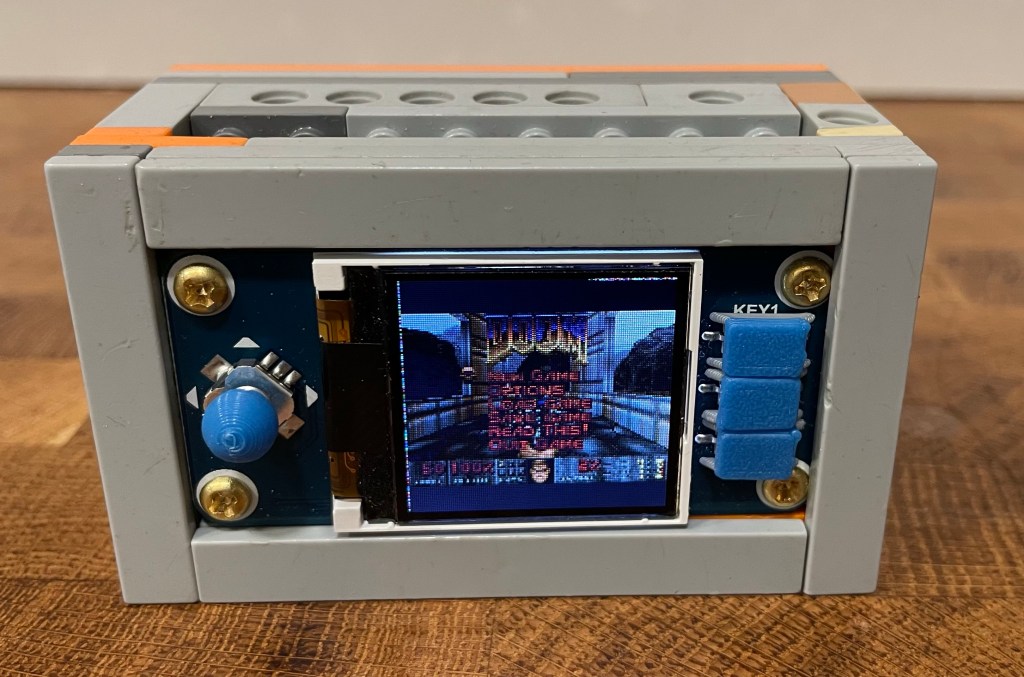
The retro console running the game Doom.

Hardware

I used a Waveshare 128×128, 1.44inch LCD display HAT which is a good fit because it contains both a LCD display and GPIO keys that can be used as a gamepad.

The board is a HAT for the Raspberry Pi Zero 2W board, HATs are expansion boards whose connectors are compatible with the RPi Zero 2W pinout.

And that is all the hardware needed if the console will just be powered with a micro USB cable. But it is of course more fun to make the handheld portable and for that I used the Waveshare UPS HAT.

Software

I just used a stock Fedora Server image for this project, no additional software was needed than what is already packaged in the distro.

The image can be flashed using the arm-image-installer tool. There is no support for the RPi Zero 2W but since is quite similar to the RPi3, that can just be used as the target instead, i.e:

sudo arm-image-installer --image=Fedora-Server-36-1.5.aarch64.raw.xz \
--target=rpi3 --media=/dev/$device --addkey=id_rsa.pub --norootpass --resizefs

Where $device is the block device for the uSD card used to install the OS.

Then I followed these steps:

  1. Boot the uSD card, go through Fedora initial setup, create a retroarch user and make it member of the video and input groups.

  2. Install a Libretro emulator (i.e: mGBA for Game Boy Advance) and the Retroarch frontend.

sudo dnf install libretro-mgba retroarch
  1. Create a user service to run the game.
$ mkdir -p ~/.config/systemd/user/
$ cat > ~/.config/systemd/user/retroarch.service
<< EOF
[Unit]
Description=Start Doom
[Service]
ExecStart=retroarch -L /lib64/libretro/mgba_libretro.so /home/retroarch/roms/doom.zip
Restart=always
[Install]
WantedBy=default.target
EOF
  1. Enable the service and lingering for the retroarch user, the latter is needed to allow the service to start at boot even when the user was not logged in.
$ systemctl --user enable retroarch.service
$ sudo loginctl enable-linger retroarch
  1. Add RPi config snippets to support the LCD and GPIO keys.

Two Device Tree Blob Overlays (DTBO) are used to drive the SPI controller of the LCD panel and the GPIO keys. These are adafruit-st7735r.dtbo and gpio-key.dtbo.

The overlays support options that can be configured in the RPi config.txt file such as the pins used, display resolution, if the display has to be rotated, the input event code that has to be reported for each GPIO key and so on.

For the HAT mentioned above, the following has to be added to the /boot/efi/config.txt file:

# Enable SPI
dtparam=spi=on
# TFT LCD Hat
dtoverlay=adafruit-st7735r,128x128,dc_pin=25,reset_pin=27,led_pin=24,rotate=90
# GPIO keys configuration
# Directional pad (KEY_UP, KEY_LEFT, KEY_RIGHT, KEY_DOWN, BTN_ENTER)
dtoverlay=gpio-key,gpio=6,active_low=1,gpio_pull=up,label=UP,keycode=103
dtoverlay=gpio-key,gpio=5,active_low=1,gpio_pull=up,label=LEFT,keycode=105
dtoverlay=gpio-key,gpio=26,active_low=1,gpio_pull=up,label=RIGHT,keycode=106
dtoverlay=gpio-key,gpio=19,active_low=1,gpio_pull=up,label=DOWN,keycode=108
dtoverlay=gpio-key,gpio=13,active_low=1,gpio_pull=up,label=PRESS,keycode=28
# Buttons (KEY_X, KEY_Z, KEY_A)
dtoverlay=gpio-key,gpio=21,active_low=1,gpio_pull=up,label=KEY_1,keycode=45
dtoverlay=gpio-key,gpio=20,active_low=1,gpio_pull=up,label=KEY_2,keycode=44
dtoverlay=gpio-key,gpio=16,active_low=1,gpio_pull=up,label=KEY_3,keycode=30
  1. Workaround a bug in the st7735r driver that prevents the module to be auto loaded.

There is a bug in the st7735r driver which causes the module to not be loading automatically. To workaround this issue, create a modules-load.d config snippet to force the module to be loaded:

$ echo st7735r | sudo tee /etc/modules-load.d/st7735r.conf

Unfortunately this is a quite common bug in SPI drivers. But for this particular driver the workaround should not be needed in the future since it was already fixed by this commit. But at the time of this writing, the Fedora version used (36) still does not contain the fix.

  1. Prevent the simpledrm driver to be initialized.

The firmware seems to add a "simple-framebuffer" Device Tree node even when there is no monitor connected in its mini HDM port. This leads to the simpledrm driver to be probed, so it needs to be denied listed using a kernel command line parameter:

$ sudo grubby --update-kernel=DEFAULT \
--args=initcall_blacklist=simpledrm_platform_driver_init
  1. Update the adafruit-st7735r.dtbo to the latest version.

This was the only change I needed in Fedora 36. The issue is that the adafruit-st7735r.dtbo overlay is for the legacy fb_st7735r driver instead of the DRM st7735r driver. The latter has a different Device Tree node property to specify the display rotation and so the rotate=90 option specified in the config.txt file will be ignored.

$ wget https://github.com/raspberrypi/firmware/raw/master/boot/overlays/adafruit-st7735r.dtbo
$ sudo mv adafruit-st7735r.dtbo /boot/efi/overlays/

Happy gaming!

A framebuffer hidden in plain sight

Soon after I set up my Rockpro64 board, Peter Robinson told me about an annoying bug that happened on machines with a Rockchip SoC.

The problem was that the framebuffer console just went away after GRUB booted the Linux kernel. We started looking at this and Peter mentioned the following data points:

  • Enabling early console output on the framebuffer registered by the efifb driver (earlycon=efifb efi=debug) would get some output but at some point everything would just go blank.
  • The display worked when passing fbcon=map:1 and people were using that as a workaround.
  • Preventing the efifb driver to be loaded (modprobe.blacklist=efifb) would also make things to work.

So the issue seemed to be related to the efifb driver somehow but wasn’t clear what was happening.

What this driver does is to register a framebuffer device that relies on the video output configured by the firmware/bootloader (using the EFI Graphics Output Protocol) until a real driver takes over an re-initializes the display controller and other IP blocks needed for video output.

I read The Framebuffer device and The Framebuffer Console sections in the Linux documentation to get more familiar about how this is supposed to work.

What happens is that the framebuffer console is bound by default to the first framebuffer registered, which is the one registered by the efifb driver.

Later, the rockchipdrm driver is probed and a second framebuffer registered by the DRM fbdev emulation layer but the frame buffer console is still bound to the first frame buffer, that’s using the EFI GOP but this gets destroyed when the kernel re-initializes the display controller and related IP blocks (IOMMU, clocks, power domains, etc).

So why are users left with a blank framebuffer? It’s because the framebuffer is registered but it’s not attached to the console.

Once the problem was understood, it was easy to solve it. The DRM subsystem provides a drm_aperture_remove_framebuffers() helper function to remove any existing drivers that may own the framebuffer memory, but the rockchipdrm driver was not using this helper.

The proposed fix (that landed in v5.14-rc1) then is for the rockchipdrm driver to call the helper to detach any existing early framebuffer before registering its own.

After doing that, the early framebuffer is unbound from the framebuffer console and the one registered by the rockchipdrm driver takes over:

[   40.752420] fb0: switching to rockchip-drm-fb from EFI VGA

The curious case of the ghostly modalias

I was finishing my morning coffee at the Fedora ARM mystery department when a user report came into my attention: the tpm_tis_spi driver was not working on a board that had a TPM device connected through SPI.

There was no /dev/tpm0 character device present in the system, even when the driver was built as a module and the Device Tree (DT) passed to the kernel had a node with a "infineon,slb9670" compatible string.

Peter Robinson chimed in and mentioned that he had briefly looked at this case before. The problem, he explained, is that the module isn’t auto-loaded but that manually loading it make things to work.

At the beginning he thought that this was just a common issue of a driver not having module alias information. This would lead to kmod not knowing that the module has to be loaded, when the kernel reported a MODALIAS uevent as a consequence of the SPI device being registered.

But when checking the module to confirm that theory, he found that there were alias entries:

$ modinfo drivers/char/tpm/tpm_tis_spi.ko | grep alias
alias:          of:N*T*Cgoogle,cr50C*
alias:          of:N*T*Cgoogle,cr50
alias:          of:N*T*Ctcg,tpm_tis-spiC*
alias:          of:N*T*Ctcg,tpm_tis-spi
alias:          of:N*T*Cinfineon,slb9670C*
alias:          of:N*T*Cinfineon,slb9670
alias:          of:N*T*Cst,st33htpm-spiC*
alias:          of:N*T*Cst,st33htpm-spi
alias:          spi:cr50
alias:          spi:tpm_tis_spi
alias:          acpi*:SMO0768:*

Since the board uses DT to describe the hardware topology, the TPM device should had been registered by the Open Firmware (OF) subsystem. And should cause the kernel to report a "MODALIAS=of:NspiTCinfineon,slb9670", which should had matched the "of:N*T*Cinfineon,slb9670" module alias entry.

But when digging more on this issue, things started to get more strange. Looking at the uevent sysfs entry for this SPI device, he found that the kernel was not reporting an OF modalias but instead a legacy SPI modalias: "MODALIAS=spi:slb9670".

But how come? a user asked, the device is registered using DT, not platform code! Where is this modalias coming from? Is this legacy SPI device a ghost?

Peter said that he didn’t believe in paranormal events and that there should be a reasonable explanation. So armed with grep, he wanted to get to the bottom of this but got preempted by more urgent things to do.

Coincidentally, I had chased down that same ghost before many moons ago. And it’s indeed not a spirit from the board files dimension but only an incorrect behavior in the uevent logic of the SPI subsystem.

The reason is that the SPI uevent handler always reports a MODALIAS of the form "spi:foobar" even for devices that are registered through DT. This leads to the situation described above and it’s better explained by looking at the SPI subsystem code:

static int spi_uevent(struct device *dev, struct kobj_uevent_env *env)
{
	const struct spi_device		*spi = to_spi_device(dev);
	int rc;

	rc = acpi_device_uevent_modalias(dev, env);
	if (rc != -ENODEV)
		return rc;

	return add_uevent_var(env, "MODALIAS=%s%s", SPI_MODULE_PREFIX, spi->modalias);
}

Conversely, this is what the platform subsystem uevent handler does (which properly reports OF module aliases):

static int platform_uevent(struct device *dev, struct kobj_uevent_env *env)
{
	struct platform_device	*pdev = to_platform_device(dev);
	int rc;

	/* Some devices have extra OF data and an OF-style MODALIAS */
	rc = of_device_uevent_modalias(dev, env);
	if (rc != -ENODEV)
		return rc;

	rc = acpi_device_uevent_modalias(dev, env);
	if (rc != -ENODEV)
		return rc;

	add_uevent_var(env, "MODALIAS=%s%s", PLATFORM_MODULE_PREFIX,
			pdev->name);
	return 0;
}

Fixing the SPI core would be trivial, but the problem is that there are just too many drivers and Device Trees descriptions that are relying on the current behavior.

It should be possible to change the core, but first all these drivers and DTs have to be fixed. For example, the I2C subsystem had the same issue but has already been resolved.

A workaround then in the meantime could be to add to the legacy SPI device ID table all the entries that are found in the OF device ID table. That way, a platform using for example a DT node with compatible "infineon,slb9670" will match against an alias "spi:slb9670", that will be present in the module.

And that’s exactly what the proposed fix for the tpm_tis_spi driver does.

$ modinfo drivers/char/tpm/tpm_tis_spi.ko | grep alias
alias:          of:N*T*Cgoogle,cr50C*
alias:          of:N*T*Cgoogle,cr50
alias:          of:N*T*Ctcg,tpm_tis-spiC*
alias:          of:N*T*Ctcg,tpm_tis-spi
alias:          of:N*T*Cinfineon,slb9670C*
alias:          of:N*T*Cinfineon,slb9670
alias:          of:N*T*Cst,st33htpm-spiC*
alias:          of:N*T*Cst,st33htpm-spi
alias:          spi:cr50
alias:          spi:tpm_tis_spi
alias:          spi:slb9670
alias:          spi:st33htpm-spi
alias:          acpi*:SMO0768:*

Until the next mystery!

A lethal spurious interrupt

A big part of my work on Fedora/RHEL is to troubleshoot and do root cause analysis across the software stack. Because many of these projects are decades old, this usually feels like being stuck somewhere between being an archaeologist and a detective.

Many bugs are boring but some are interesting, either because the investigation made me learn something new or due to the amount of effort that was sunk into figuring out the problem. So I thought that it would be a nice experiment to share a little about the ones that are worth mentioning. This is the first of such posts, I may write more in the future if have time and remember to do it:

It was a dark and stormy night when Peter Robinson mentioned a crime to me, a Rockpro64 board was found to not boot when the CONFIG_PCIE_ROCKCHIP_HOST option was enabled. He also already had found the criminal, it was the CONFIG_DEBUG_SHIRQ option.

I have to admit that I only knew CONFIG_DEBUG_SHIRQ by name and that it was a debug option for shared interrupts, but didn’t even know what this option was about. So the first step was to read the help text of the Kconfig symbol to learn more on this option.

Enable this to generate a spurious interrupt just before a shared interrupt handler is deregistered (generating one when registering is currently disabled). Drivers need to handle this correctly. Some don’t and need to be caught.

This was the smoking gun: a spurious interrupt!

We now knew what was the weapon used but we still had questions, why would triggering an interrupt lead to the board being hung? The next step then was to figure out where exactly this was happening, it certainly would have to be somewhere in the driver’s IRQ handler code path.

By looking at the pcie-rockchip-host driver code, we see two IRQ handlers registered: rockchip_pcie_subsys_irq_handler() for the "pcie-sys" IRQ and rockchip_pcie_client_irq_handler() for the "pcie-client" IRQ.

Adding some debug printouts to both would show us that the issue was happening in the latter, when calling to rockchip_pcie_read(). This function just hangs indefinitely and never returns.

Peter wrote in the filled bug that this issue was reported before and there was even an RFC patch posted by a Rockchip engineer, who mentioned the assessment of the problem:

With CONFIG_DEBUG_SHIRQ enabled, the irq tear down routine
would still access the irq handler register as a shared irq.
Per the comment within the function of __free_irq, it says
"It’s a shared IRQ — the driver ought to be prepared for
an IRQ event to happen even now it’s being freed". However
when failing to probe the driver, it may disable the clock
for accessing the register and the following check for shared
irq state would call the irq handler which accesses the register
w/o the clk enabled. That will hang the system forever.

The proposed solution was to check in the rockchip_pcie_read() function if a rockchip->hclk_pcie clock was enabled before trying to access the PCIe registers’ address space. But that wasn’t accepted because it was solving the symptom and not the cause.

But it did confirm our findings, that the problem was an IRQ handler being called before it was expected and that the PCIe register access hangs due to a clock not being enabled.

With all of that information and reading once more the pcie-rockchip-host driver code, we could finally reconstruct the crime scene:

  1. "pcie-sys" IRQ is requested and its handler registered.
  2. "pcie-client" IRQ is requested and its handler registered.
  3. probe later fails due to readl_poll_timeout() returning a timeout.
  4. the "pcie-sys" IRQ handler is unregistered.
  5. CONFIG_DEBUG_SHIRQ triggers a spurious interrupt.
  6. "pcie-client" IRQ handler is called for this spurious interrupt.
  7. IRQ handler tries to read PCIE_CLIENT_INT_STATUS with clocks gated.
  8. the machine hangs because rockchip_pcie_read() call never returns.

The root cause of the problem then is that the IRQ handlers are registered too early, before all the required resources have been properly set up.

Our proposed solution then is to move all the IRQ initialization into a later stage of the probe function. That makes it safe for the IRQ handlers to be called as soon as they are registered.

Until the next mystery!